Making Your First Open Source Contribution With a Clear Git Workflow
Learn how to make your first open source contribution step by step. From forking repositories to creating pull requests, this guide covers everything you need to start contributing to open source projects.
Updated October 22, 2026
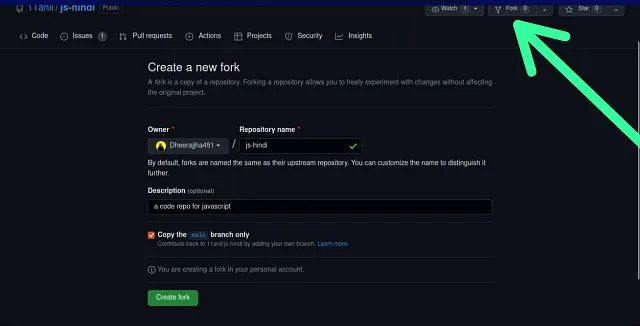
Your first open source contribution can be small: a documentation correction, a reproducible bug fix, or a test for an uncovered case. The main challenge is learning how to make a change that another person can review confidently.
This guide follows a fork and pull request workflow on GitHub. Replace the example repository names with the project you want to contribute to, and check its contribution guide before starting.
1. Choose a task and read the project’s guidance
Read the README, CONTRIBUTING.md, and any issue templates. Check how to install dependencies, run the project, and verify a change. If an issue is already assigned, or the project asks contributors to discuss features first, follow that process.
A good first task has a clear expected result. You should be able to explain what was wrong, what you changed, and how you checked it.
2. Fork and clone the repository
On GitHub, create a fork under your own account. Then clone that fork locally:
git clone https://github.com/YOUR-USERNAME/PROJECT.git
cd PROJECT
git remote add upstream https://github.com/ORIGINAL-OWNER/PROJECT.git
git remote -v
Here, origin is your fork and upstream is the original project. These are conventional names, not special types of remote.
3. Create a branch from the current base
This example assumes the project’s base branch is main. Some projects use another name.
git fetch upstream
git switch main
git merge --ff-only upstream/main
git switch -c fix/documentation-example
The fast forward only update stops if your local main has diverged, so you can inspect it before deciding how to integrate changes. Fetching alone updates remote tracking references; it does not change your working files.
4. Make one focused change
Install and test the project using its documented commands. Keep the change related to the issue, and avoid unrelated formatting or dependency updates.
Useful contributions include:
- Fixing a bug with a reproducible example.
- Improving an unclear installation step.
- Adding a missing test.
- Correcting an accessibility issue.
If a change affects behaviour, add the appropriate test or explain how to reproduce and verify it. Documentation changes should be checked in the relevant preview when the project provides one.
5. Review and commit your work
A commit is a snapshot of the staged changes, together with metadata and a message. Before creating one, inspect what you will include:
git status
git diff
git add path/to/changed-file
git diff --cached
git commit -m "Fix the installation example in the setup guide"
Stage the files that belong to the contribution. Reviewing the staged diff helps catch temporary files, accidental edits, and details that do not belong in the pull request.
6. Push your branch and open a pull request
git push -u origin fix/documentation-example
Open a pull request from that branch in your fork to the project’s intended base branch. Describe:
- The problem: what fails or what is confusing.
- The change: what the patch does.
- Verification: the checks you ran and their results.
- Issue context: the relevant issue number, if there is one.
A short, specific description is easier to review than a long account of every command you ran.
7. Respond to review
A maintainer may ask for changes, more tests, or a different approach. Make the updates on the same branch, commit them, and push again. The existing pull request will update.
Approval and merging follow the project’s policy; a technically correct change can still need discussion about scope or maintenance. Give maintainers time and keep the conversation focused on the proposed change.
Common problems
I pushed to the wrong remote
Inspect git remote -v and the branch’s upstream with git branch -vv. Your contribution branch should normally be pushed to your fork. Change the remote configuration only after checking the intended destination.
My branch has conflicts
Fetch the latest upstream changes, then follow the project’s merge or rebase policy. If you need to rebase a branch that others use, coordinate first because rebasing changes commit identities.
I do not know what to work on
Look for a documented beginner friendly issue or an improvement you can reproduce. Ask a focused question if the expected behaviour is unclear. Understanding the project well enough to make a small improvement is a useful first contribution in itself.