WebAnnotates Case Study: From Website Feedback to Shippable Changes
How WebAnnotates turns vague website feedback into visual, actionable work that can move through Jira, Notion, GitHub, and the coding workflow your team already uses.
Website feedback should be obvious. Instead, it often arrives as a message like: “The button is wrong on the pricing page.” The person receiving it has to find the page, guess the viewport, identify the element, ask follow-up questions, create a ticket, and then translate the request again for engineering.
That is not a feedback problem. It is a context problem.
WebAnnotates is built to close that gap. It gives teams one visual path from a comment on a live website to a trackable piece of work—and, when appropriate, to a coding-agent plan, fix, or pull request.
The challenge: feedback loses meaning as it travels
Product teams, agencies, marketers, and clients all review websites. But the handoff is often fragmented across screenshots, chat threads, documents, ticketing tools, and pull requests. Every transfer creates another chance to lose the detail that made the feedback useful.
The real cost is not just the time spent writing tickets. It is the back-and-forth:
- “Which page are you looking at?”
- “Can you send a screenshot?”
- “What exactly should change?”
- “Is this a small copy update or a design issue?”
- “Has someone already fixed it?”
WebAnnotates is designed to replace that ambiguity with a review workflow that begins on the page itself.
The approach: make context the default
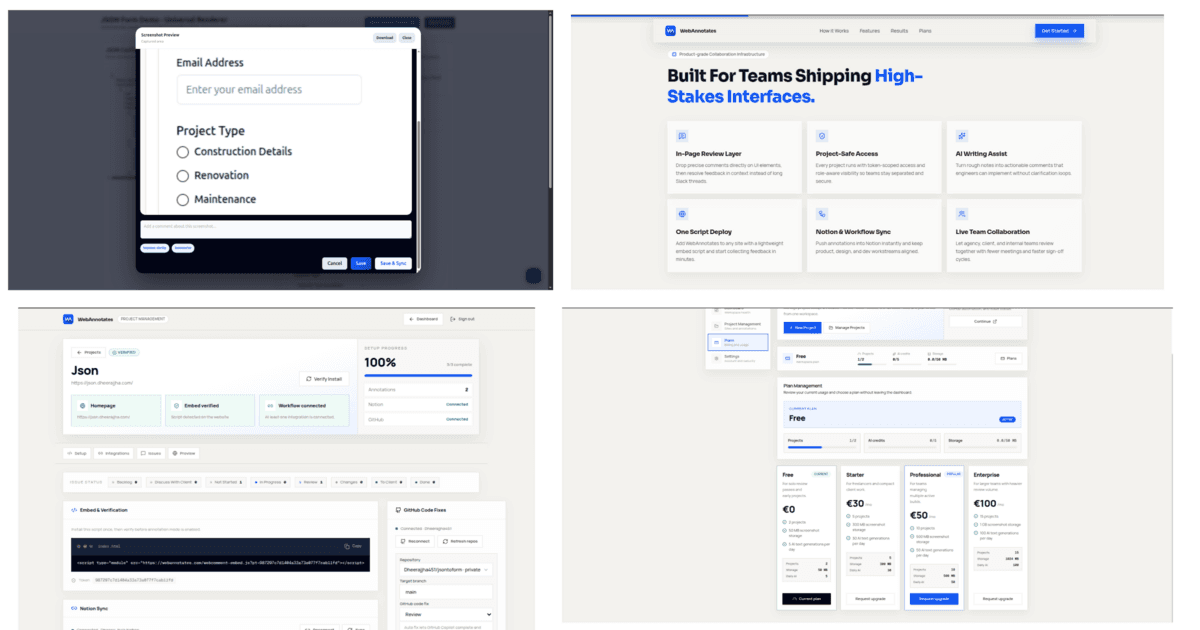
When a reviewer clicks an element, WebAnnotates can capture the element-level context alongside the comment: the page URL, selected text, priority, status, assignee context, and optional screenshot. The feedback becomes a concrete work item before it ever reaches a developer.
Review where the work is visible
Teams can annotate permitted websites from the browser or the Chrome extension. Instead of describing an interface from memory, a reviewer points directly to it.
Make rough feedback actionable
AI assistance can improve or summarize a comment before it is saved, helping a short observation become a clearer implementation brief.
Keep delivery in the tools your team uses
Per-project Jira or Notion connections turn annotations into tickets, keeping review work in the same project system as the rest of the team.
Connect feedback to implementation
GitHub and coding-agent workflows can plan a change, implement a fix, or prepare a pull request—without making feedback another disconnected queue.
The workflow in practice
1. Capture the issue in context
A stakeholder opens the live experience and selects the element that needs attention. They leave a note, set a priority, and can include a screenshot when visual context matters. The request begins with the evidence the next person needs.
2. Clarify before the handoff
Not every reviewer writes engineering-ready requirements—and they should not have to. WebAnnotates can help polish or summarize the note before it is saved. The goal is not to replace the reviewer’s judgment; it is to remove avoidable ambiguity from the handoff.
3. Triage once, then send it forward
Annotations live in a project workspace where teams can review status, ownership, and the original context. From there, the same annotation can be synced into the project’s Jira or Notion workflow. The ticket carries the comment, source page, workflow values, and screenshot link where available.
4. Choose the implementation path
Some feedback only needs a ticket. Other work can move into a coding workflow. WebAnnotates supports planning, local fixes, and fix-plus-pull-request flows, so a team can choose the level of automation that matches the risk of the change.
Why the coding workflow is different
The useful part of AI-assisted implementation is not simply asking a model to change code. It is retaining the feedback context while keeping developer control over the repository.
For local agent workflows, WebAnnotates pairs a runner with a user and verified repository mapping. The runner detects available local providers—including Codex, Claude Code, OpenCode, and GitHub Copilot CLI—then uses an isolated Git worktree for the job. A plan can be completed without code changes; a fix can be reviewed locally; a fix-plus-pull-request flow can validate changes, push a branch, and prepare the next review step.
Customer value by team
For product teams
Convert QA and stakeholder feedback into visible, prioritised work without forcing every reviewer to learn the ticketing system first.
For agencies
Give clients a clearer way to review live pages, reduce subjective “this feels off” messages, and keep a traceable record of what was requested.
For marketing teams
Turn copy, campaign, and conversion feedback into implementation-ready notes while preserving the exact location that prompted the request.
For engineering teams
Receive better tickets with source context, make trade-offs in the tools you already use, and selectively route well-scoped work into a coding workflow.
Built for the messy middle of collaboration
Most teams do not need another place to discuss work. They need a dependable bridge between the people who spot a problem and the people who ship the fix.
WebAnnotates keeps that bridge practical:
- Element comments and screenshots keep a request grounded in the page.
- Project dashboards provide a home for triage, ownership, and status.
- Jira and Notion integrations are configured per project.
- GitHub integration connects feedback to the codebase where implementation happens.
- Browser and Chrome-extension capture fit naturally into existing review habits.
- Project-scoped access controls and authenticated APIs keep workflows separated by project.
What a better review conversation sounds like
Without visual context: “Please make the hero section feel more premium.”
With WebAnnotates: “On the pricing page hero, reduce the vertical gap above the primary CTA, align the proof row with the headline, and keep the change within the current desktop layout. Priority: medium.”
The second version is still human feedback. It is simply feedback that can move.
Do we need to replace Jira or Notion?
No. WebAnnotates is designed to send annotations into the project system your team already uses. Each project can connect its Jira or Notion workflow.
Is every annotation sent to a coding agent?
No. Teams can keep feedback as an annotation or ticket, or choose a planning, fix, or pull-request workflow when a request is appropriately scoped.
Can reviewers work directly on a website?
Yes. WebAnnotates supports browser-based review through permitted websites and a Chrome extension, allowing feedback to start on the live interface.
How does the local coding-agent workflow protect repository access?
The paired local runner works only with verified repository mappings and available local agent CLIs. It prepares isolated Git worktrees, while credentials remain on the user’s machine.
The result: feedback that moves at the speed of a decision
WebAnnotates gives customers a clearer path from I noticed something to the right person can act on it. It connects visual review, ticket creation, and implementation without asking teams to abandon the tools or safeguards they already trust.
If your website feedback currently starts in screenshots and ends in status meetings, start with the page instead. Explore WebAnnotates and turn the next comment into work that is ready to move.