From a Single Server to a Scalable SaaS Application: My Real-World System Design Journey
Lessons from evolving a manufacturing SaaS product from a single server into a scalable application—covering performance, shared data, load balancing, and background processing.
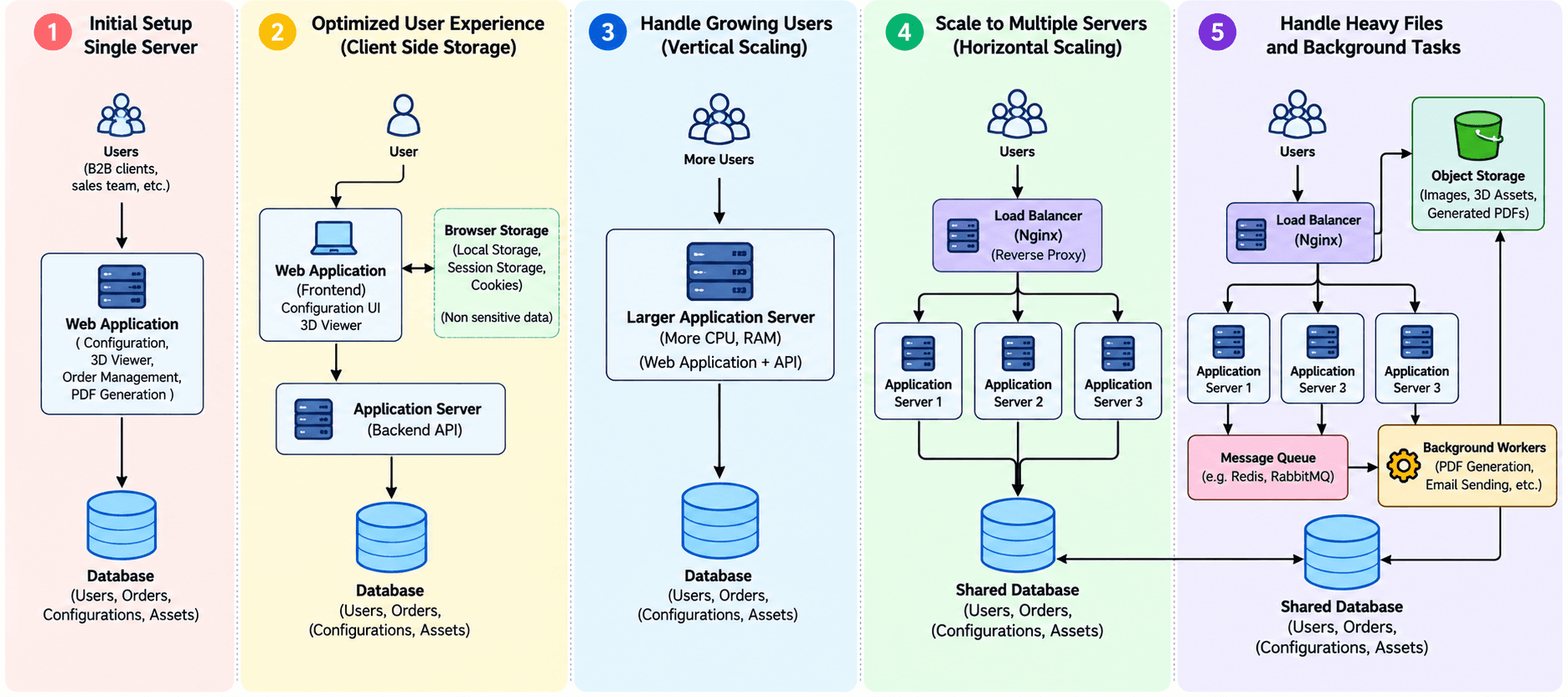
For more than one year, I have been contributing to a SaaS application related to the manufacturing industry.
This project gave me the opportunity to understand how an application evolves from an initial idea to a real-world product used by multiple B2B businesses.
I wanted to share some of the challenges we faced and how my understanding of system design improved throughout this journey.
The evolution path
Scale the constraint—not the diagram.
Each stage responds to a real bottleneck. Moving forward only makes sense when the previous approach has become the constraint.
How everything started
The initial problem statement was simple but interesting.
Manufacturing businesses were sharing product configurations with customers through PDF documents.
These documents contained different product specifications and configuration details.
The client wanted to move this process to a web application where users could fill in configuration details and visualize certain parts of the product in 3D.
I started by understanding the requirements and preparing the initial proposal and architecture overview.
At that stage, our main focus was building a working application.
As the project gradually grew, we added more features like order management, configuration management, 3D visualization, automatic PDF generation, and sending documents to customers.
As more businesses started using the application, new challenges appeared.
Issue 1: Why was the application slow?
Initially, we had not optimized everything.
We were repeatedly retrieving user sessions, roles, and other information from the database.
This resulted in unnecessary database operations and increased response times.
We started optimizing repeated database calls and improving how client-side state was managed.
Browser storage helped us manage certain non-sensitive information, while secure authentication and permission validation remained the responsibility of the backend.
One important thing I learned was that local storage should never be trusted as the source of truth for user permissions.
A user can modify browser storage, so the server must independently verify whether an operation is allowed.
This taught me that before scaling infrastructure, we should first understand why an application is slow.
Issue 2: What happens when users and orders increase?
As more businesses started using the platform, the workload increased.
More orders were being created, updated, and deleted. Product configurations became more detailed, and features like 3D visualization and PDF generation introduced additional processing requirements.
We started with vertical scaling.
Vertical scaling means increasing the resources of an existing server, such as CPU and RAM.
Instead of introducing additional servers immediately, we increased the capacity of the existing server to handle the growing workload.
This was a practical approach for that stage of the application.
However, there is a limit to how much a single server can be upgraded.
Start with the smallest useful change
Increasing capacity on one server can be the right move when it removes the current bottleneck with minimal operational complexity.
Know the trade-off
A larger machine still creates a single application-server boundary. Eventually, demand may require the work to be distributed.
Issue 3: How do we handle more concurrent requests?
As traffic continued to increase, relying on a single application server became a limitation.
This is where horizontal scaling came into the picture.
Horizontal scaling means adding more application instances instead of only increasing the resources of one server.
With multiple application instances, incoming requests can be handled by different servers.
This can increase overall capacity, provided the application and its dependencies are designed to support it.
But introducing multiple servers also creates new questions.
How do we distribute requests?
How do we manage sessions?
And how do we ensure that every server works with consistent business data?
Issue 4: How do we maintain consistent data?
Imagine a user creates an order through application server one.
Later, another request from the same user reaches application server two.
The user should still be able to access the same order and configuration details.
For this, application instances can connect to a shared database.
A distributed database is not automatically required just because we have multiple application servers.
A common relational database can serve multiple instances, depending on the workload.
As traffic increases further, database performance may need additional improvements such as indexing, query optimization, caching, or read replicas.
The important learning was that application scaling and database scaling are different problems.
| If the bottleneck is... | A practical next investigation |
|---|---|
| Slow database reads | Indexes, query plans, caching, or read replicas |
| Too many concurrent requests | More application instances behind a load balancer |
| Stateful logins | Stateless authentication or a shared session store |
| Long-running document work | Queues and background workers |
Issue 5: How does Nginx distribute requests?
After introducing multiple application servers, we need a way to distribute incoming traffic.
This is where Nginx can help.
Nginx can work as a reverse proxy and load balancer.
When a request arrives, Nginx forwards it to an application server based on the configured load-balancing strategy.
This helps distribute requests across available application instances.
But load balancing alone does not solve every performance problem.
For example, if the database is slow, adding application servers may not improve response times.
Similarly, if sessions are stored only in the memory of one application instance, requests routed to another instance may cause session issues.
We need an appropriate session management strategy, such as stateless authentication or a shared session store.
Issue 6: Handling large images, PDFs, and 3D assets
Another interesting challenge was handling large files.
Our application deals with product configurations, images, 3D assets, and generated PDF documents.
These resources can consume storage, network bandwidth, and processing capacity.
As the application grows, separating file storage and background processing from the main application becomes worth considering.
One possible improvement is using object storage for uploaded images, 3D assets, and generated PDFs.
Another is using a message queue and background workers for time-consuming operations.
For example, when a user submits a product configuration, the application can save the order and create a background job for PDF generation.
A worker can process the job and send the document to the customer once it is ready.
This approach can reduce the time users spend waiting for a request to complete, although the background task still needs to finish successfully.
These are useful architectural patterns to evaluate based on actual application requirements.
Keep requests responsive
Save the order quickly, then queue work such as PDF generation so the user is not waiting on a long-running task.
Treat background work as real work
A queued job still needs status tracking, retries, and a clear path for failures—moving it off the request does not remove the responsibility.
What I learned from this journey
The biggest learning was that system design is not a one-time activity.
Initially, we focused on building a working product.
As users increased, we started focusing more on performance.
Then came infrastructure capacity, application scaling, shared data, and request distribution.
Each stage introduced a different challenge—and required a different decision.
I also learned that scaling should be based on actual bottlenecks.
Sometimes optimizing a database query is better than adding another server.
Sometimes increasing CPU and RAM is enough.
And sometimes separating heavy tasks from the request flow can make a bigger difference.
Working on a real-world SaaS product from the initial proposal to production helped me understand why architecture decisions depend on the current stage of a business.
There is still a lot to learn, but this experience has changed how I approach system design.
For me, system design is no longer just about servers, databases, and architecture diagrams.
It is about understanding real problems, making practical decisions, and building software that continues to work as the business grows.
- Measure the bottleneck before changing the architecture.
- Prefer the simplest change that safely removes the current constraint.
- Make sessions, data, and heavy background work explicit before adding more application servers.